Architect of the digital age
Fix Ink Smears When Printing on Epson EcoTank Printer (2025)
30 November 2025
If you notice smearing when printing, for example, a block with a lot of black ink, your Epson printer settings need to be adjusted. First, if you have not yet done so, install the Epson drivers for your printer so that you get the specialized Printer Properties dialog. Now open the thing you’re trying to print and click Printer Properties (or something similar).
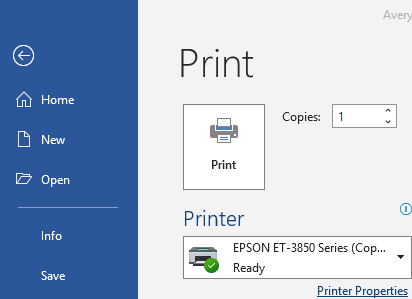
In the Printer Properties, click the Maintenance tab.
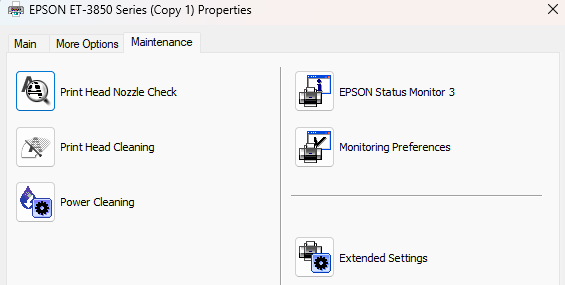
Click Extended Settings
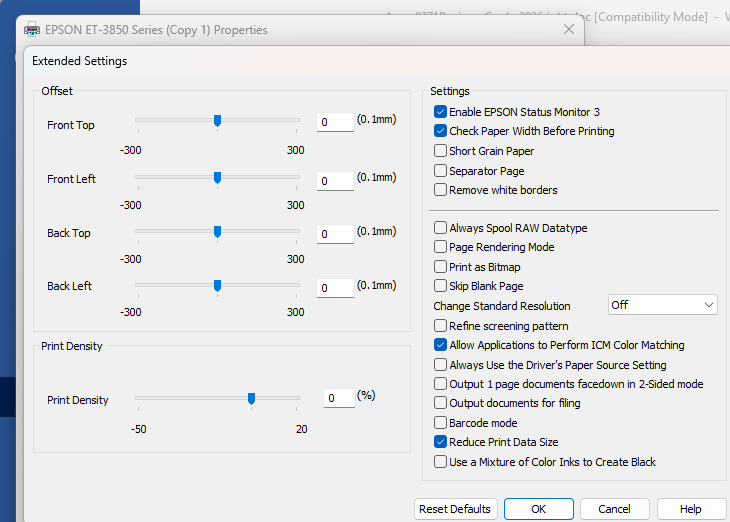
Check the second box “Check Paper Width Before Printing” and click OK. Click OK again to exit the Printer Properties dialog. Now you should be able to print without smearing. If not, you may also need to adjust the preset from standard to high quality to slow the print, on the first tab of the Printer Properties dialog.
This was targeted at my Costco special ET-3850 on Windows, but should work for other Epson printers and other OS with minor adjustments.
- Student Loan Bill Tracker
- The Anomaly Response Network
- The Mars Society
- Coca-Cola Scholars Foundation
- TechStars
- Leukemia & Lymphoma Society
- Cystic Fibrosis Foundation
- PRISM
- Free Bikes 4 Kidz
- Cincinnati Works
- Cincinnati Youth Collaborative


Reading:


Social